Free Online Courses for Digital Skills Training
Digiskills.pk offers Pakistan's largest selection of 100% free online courses in digital skills training. From freelancing to graphic design, our expert-led, self-paced courses equip students and p...
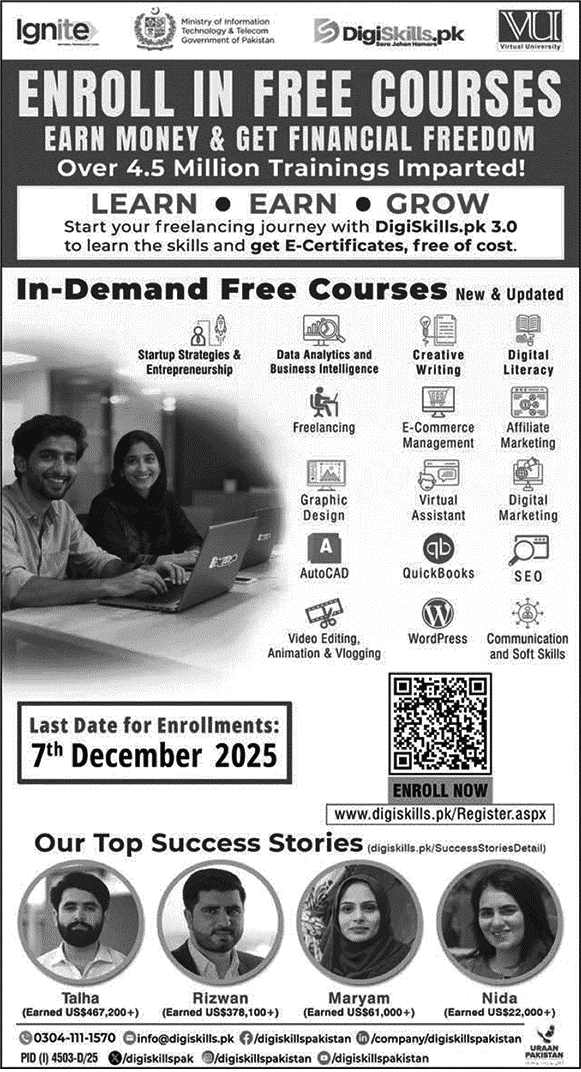
Course list:
Startup Strategies & Entrepreneurship
Data Analytics & Business Intelligence
Creative Writing
Digital Literacy
Freelancing
E-Commerce Management
Affiliate Marketing
Graphic Design
Virtual Assistant
Digital Marketing
Auto CAD
Quick Books
SEO
Video Editing, Animation & Vlogging
Wordpress
Communication and Soft Skills
Last Date to Apply:
14 December 2025
How to Apply Digiskills Free Courses:
How to Apply for DigiSkills Free Courses
Follow the steps below to successfully register and enroll in DigiSkills.pk free courses:
Step 1: Visit the DigiSkills Official Website
1. Go to the official website: DigiSkills.pk
2. (Always use the official site only.)
Step 2: Create Your DigiSkills Account
1. Click on “Sign Up”*
2. Enter:
3. Full Name
4. Email Address
5. CNIC Number / B-form
6. Mobile Number
7. Create a passwordVerify your email through the confirmation link sent by DigiSkills.
Step 3: Log In to Your Account
Once your email is verified, log in to your DigiSkills account using your email and password.
Step 4: Complete Your Profile
1. Fill in the required details:
2. Personal Information
3. Education Details
4. City/District
5. Gender
6. Occupation
7. Make sure all details are correct because they appear on your certificate.
Step 5: Enroll in Courses
1. After completing the profile, go to the “Enroll Now”* section.
2. Select up to 2 courses* of your choice (per batch).
3. Click “Enroll”* to confirm your selection.
Step 6: Start Your Classes
1. Once the batch starts:
2. Login to your DigiSkills LMS
3. Watch video lectures weekly
4. Attempt quizzes
5. Complete all tasks/assignments on time
Step 7: Complete All Requirements
1. To qualify for the certificate:
2. Watch at least 70%* video lectures
3. Attempt quizzes and assignments before the deadlines
Step 8: Download Your Certificate
1. After the batch ends:
2. Login to your account
3. Download your verified certificate* from the LMS
Use it for freelancing profiles, CVs, or job applications
Contact
Get in touch for job updates
Phone
dailyjobs009@gmail.com
© 2025. All rights reserved.